Ch. 01·YouTube to MP4

01 / 04

YouTube to MP4.
No ads.

Save any YouTube video as a clean MP4 — up to 4K, no watermark, no popup ads, no fake download buttons. Built for creators saving their own work, not for piracy.

youtube.com or youtu.be share links~30s · 1080p · 4K
No watermarkNo popup ads1080p · 4KMobile-friendly

youtube → mp4 · live

Fig. 01 — paste link → MP4 in ~30s1080p

Ch. 02·How it works

02 / 04

Three steps. Thirty seconds.

01

Step 01

Copy the link

Hit Share on the YouTube video. Copy the URL.

02

Step 02

Paste it here

Drop the link into the input. We detect format and quality automatically.

03

Step 03

Get the MP4

Sign up free. The MP4 lands in your dashboard in under 30 seconds for most clips.

Ch. 03·Quality

03 / 04

Pick what you need. Skip what you don't.

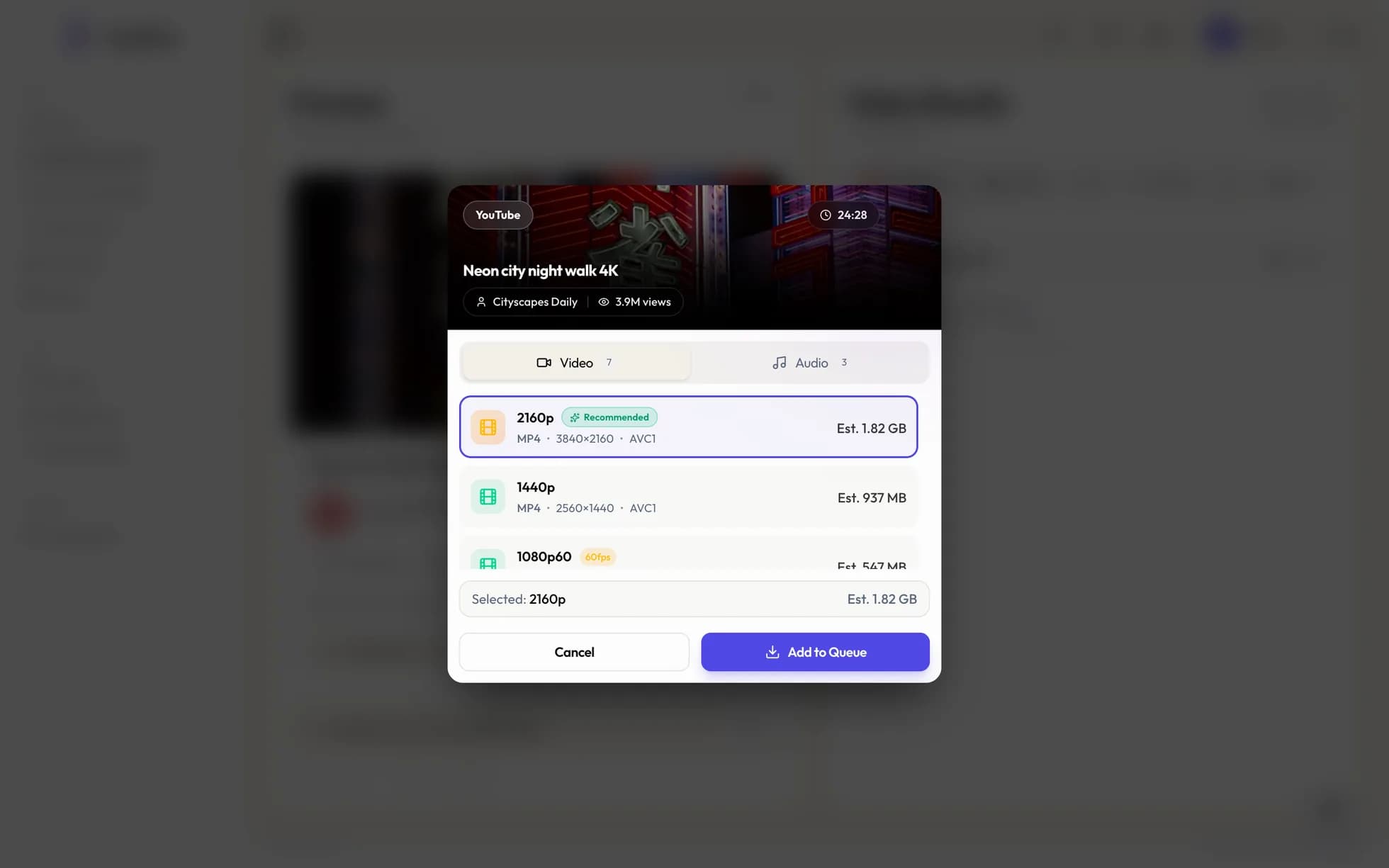
Most YouTube downloaders cap free downloads at 720p so you'll upgrade. We don't. The free output is whatever YouTube serves at the source.

Default

1080p · MP4

What most YouTube videos serve at native resolution. Clean H.264 output.

When source allows

4K · MP4

If the video was uploaded in 4K, you get 4K back. We don't upscale to fake higher resolution.

Audio only

MP3 · 320 kbps

Strip the audio for podcast clips, voiceover references, or beat samples. Skip the file size of full video.

Custom

Pick the format

MOV, WebM, or different bitrates inside the dashboard once your account is set up.

YouPro vs the free downloader sites.

Same end result, different path to getting there. The free sites pay their bills with your time and attention. We pay for ours with paid plans, so the free one stays clean.

YouProFree downloader sites
WatermarkNeverOn free tiers
Popup adsNoneOften 3+
Fake download buttonsNoneCommon
Output qualityUp to 4K, sourceOften capped 720p
Speed~30s, cloud GPUsSlow, queued
Mobile-friendlyYes — Safari, ChromeOften desktop-only UI

Ch. 04·Who it's for

04 / 04

Built for creators. Not piracy.

The four use cases people actually open this page for. Saving your own uploads. Pulling masters for editing. Building reference folders. Watching offline. Respect copyright on everything else.

Save your own

Back up your own uploads.

Channels get strikes. Videos get age-restricted. Save your masters before YouTube decides for you.

Repurpose

Pull source MP4s for editing.

Drop the file straight into Premiere, CapCut, DaVinci. No re-recording, no quality loss from screen capture.

Reference

Build an editor swipe file.

Save tutorials, color grades, transitions you want to study. Folders are easier to search than a watch-later list.

Offline

Watch anywhere, no app needed.

Save to your phone or laptop, watch on flights, transit, or anywhere YouTube's app loses the connection.

youtube.com or youtu.be share links~30s · 1080p · 4K

Questions

Things people ask first.

Plain-English answers on quality, speed, mobile support, and what's actually free.

Q / 001

How do I save a YouTube video as MP4?

Copy the YouTube link from the share button. Paste it into the box on this page. Sign up free, and the MP4 lands in your dashboard in under 30 seconds for most clips.

Q / 002

Is this allowed?

YouPro is built for creators saving content they have rights to — your own videos, footage you're licensed to use, references for fair-use commentary. Respect the original creator and YouTube's terms. We're not a piracy tool.

Q / 003

Does it leave a watermark?

No watermark on any plan. The MP4 you download is the source quality YouTube serves — clean, no overlay, no branding.

Q / 004

Are there ads or popups?

No. We don't run banner ads, popups, or fake download buttons. Most free YouTube downloaders survive on those — we don't, so we don't have to dodge ads to use the page.

Q / 005

What quality can I save?

Whatever YouTube serves at the source — typically up to 1080p, 4K when the original supports it. We don't re-encode unless you ask, so the output is the cleanest copy YouTube allows.

Q / 006

Does it work on iPhone or Android?

Yes. The downloader runs in any modern browser — Safari, Chrome, Firefox. No app to install. The MP4 saves to your Files app on iOS or Downloads folder on Android.

Q / 007

Can I save my own YouTube videos?

Absolutely — that's the most common use case. Creators back up their own uploads in case of takedowns, repurpose footage across platforms, or pull source MP4s for editing.

Q / 008

How long does it take?

Short videos under 5 minutes return in 10–20 seconds. Longer clips run in the background and you get a notification when ready. There's no queue — cloud GPUs handle each request in parallel.

Q / 009

Is there a length limit?

Free accounts can save videos up to 30 minutes. Pro accounts handle longer clips and full-length videos.

Q / 010

Does YouPro store the MP4 forever?

We cache the file in your dashboard for 24 hours so you can re-download without re-converting. After that it's permanently deleted from our servers. Save it to your own device.

Q / 011

Why is YouPro better than y2mate or savefrom?

Honestly: same end result, much cleaner UX. The popular free downloaders bury the actual download button under three layers of fake ads, redirect you to sketchy sites, and crank up the popup count every year. We don't run ads on this page. The product pays for itself through paid plans, not your patience.

Save it

Drop the link. No ads.

Free to start. Have a TikTok or Instagram link instead? Try the universal downloader.

youtube.com or youtu.be share links~30s · 1080p · 4K

YouPro · YouTube to MP4